VMware Cloud Foundation (VCF), deleting failed tasks is often necessary to avoid clutter in the SDDC Manager UI and free up resources. Failed tasks can also block further operations, especially credential rotation tasks.
Deleting failed tasks can help maintain a clean and organized SDDC Manager UI, making it easier to track ongoing and successful operations. Failed tasks can consume resources, potentially leading to performance issues or conflicts with other ongoing processes. Some failed tasks, like credential rotation failures, can block further credential operations until they are resolved or removed.
Deleting failed tasks is one of the prerequisites for rotating passwords via SDDC manager.
Let’s get into SDDC manager check failed tasks and delete them. This is typically done by using the SDDC Manager API or, if necessary, through manual SSH commands.
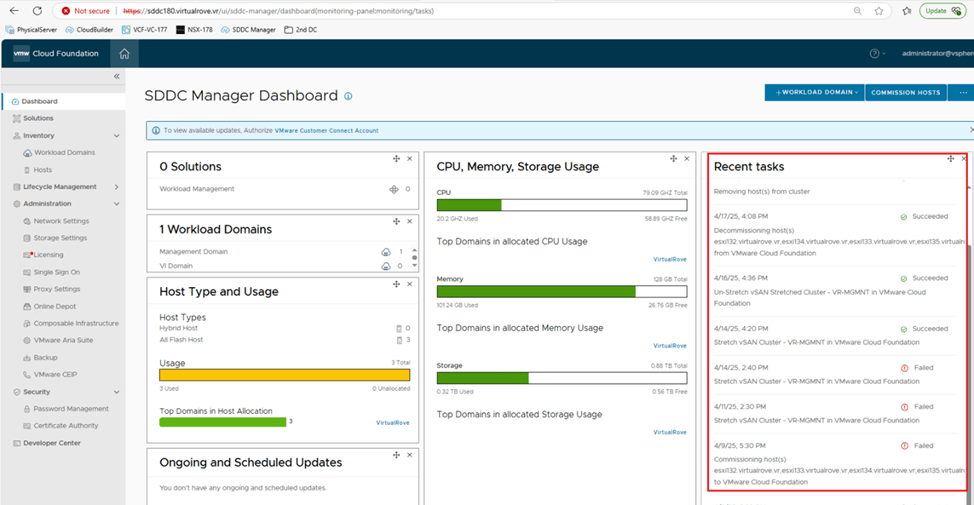
I see couple of failed tasks here on the dashboard of SDDC Manager. You can also find list of all tasks at the bottom here,

Click on the hyperlink of the task name,

Copy the task ID from the browser link,

SSH to SDDC manager using VCF account and switch to root user,

Command to delete the task is,
curl -X DELETE http://localhost/tasks/registrations/95b9cdb2-f77c-4714-90af-3441c8c466b7
The highlighted part in the command is the task id. Replace it with the task id that we obtained from the browser URL,
curl -X DELETE http://localhost/tasks/registrations/cc459fab-33eb-4620-b5d8-876ddb3e8e24

Repeat the process for remaining failed tasks,

All failed tasks have been deleted from the SDDC tasks,

You should be good to perform password rotation or any other tasks that getting prevented due to failed tasks in the SDDC manager.
Are you looking out for a lab to practice VMware products…? If yes, then click here to know more about our Lab-as-a-Service (LaaS).
Leave your email address in the box below to receive notification on my new blogs.
 Welcome to VirtualRove.COM